Showing posts with label Config & Integration. Show all posts

Integration between SAP HR Sub Modules

Posted by Unknown On

Integration between SAP HR Sub Modules
Integration is the process of connecting the different sub-modules of SAP HR. It helps  to contain the dependable data throughout the system.
PA & OM module is the base for entire SAP HR module.All sub-modules of SAP HR are integrated. Table for all  integration between all sub modules is T77S0

Integration between  Personnel Administration &  OM
Integration between PA and OM  is required to get default for job,position,org unit cost center etc in IT0001. Position is the integration between OM & PA.
Configuration Step:
IMG--> PA--> OM--> Basic settings --> integration-->set up integration with PA
Table for OM - PA integration is T77S0
In the above table set the integration switch PLOGI ORGA to X
If this is set to "X" - the integration is turned "on"
If this is a blank  - the integration is turned "off". 
Reports in PA & OM Integration/Integration tools
1. RHINTE00 - To transfer data from PA to OM
2. RHINTE10 - To transfer OM data to PA tables
3. RHINTE20  - To determine whether the data relevant for integration is available in both PA and OM
4. RHINTE30 -To update IT0001 (org assignment) 

Integration between  Personnel Administration &  PD(Personnel Planning and Development)
Integration between PA and PD is set by turn on switch the  PLOGI ORGA with an X  in T77S0 table.
Report RHINTE10 set up  PA & PD integration . This program allows you to create object types in Personnel Administration which have already set up in Personnel Planning and Development.

Integration between  Personnel Administration &  Time Management
Infotype 0007 (Planned working time) is the integration between PA & Time Management. For PA & Time integration we need to maintain Infotype 0007.
This integration is also based on PA and PSA grouping and EG and ESG grouping. 

Integration between  Personnel Administration &  Payroll
Integration between PA & Payroll through below info types.
       Recurring Payments/Deductions (0014)
       Additional Payments (0015)
       Cost Distribution (0027)
       Organizational Assignment (0001)

Integration between Personnel Administration &  Recruitment
Integration between Personnel Administration & Recruitment can set up using the following two features
Benefits
 Transfer employee data to the applicant database(feature PRELR)
 Transfer applicant data to the employee database((feature PAPLI and feature PRELI)

Integration between  Organizational Management  &  Time Management
                OM to Time management integration is take place with Shift planning and with position substitution (substitution IT 2003).
Following ere shift planning switches
PEINS  PZTEF
PEINS  VARTI
PEINS  VARTS
PEINS  VARWI
PEINS  AWART 

Integration between Organizational Management and Recruitment
This integration allows to manage company vacancies & positions.
Integration to Recruitment is switched through table T775S0
PLOGI PLOGI 01
PLOGI PRELI   99999999
PPVAC             PPVAC             1

Integration between  Time Management & Payroll
The integration between time management and payroll is through time evaluation .It allows to  determine  of the wages of employee using  time wage types determined by time evaluation.
The time wage types in tables ZL, ALP, and C1 (Cluster B2) represent the interface between time evaluation(TM) and payroll.
ZL-Contains wage types
C1- Contains data for cost account assignment
ALP-Contains the specifications on a different rate of payment
            
Integration between Recruitment and Personnel Development
This integration manage qualifications in recruitment
The integration to Personnel Administration is switched in T775S0 table
PLOGI         QUALI          1 A032 Q


Integration between SAP HR Sub Modules

Posted by Unknown On

Integration between SAP HR Sub Modules

Integration is the process of connecting the different sub-modules of SAP HR. It helps  to contain the dependable data throughout the system.
PA & OM module is the base for entire SAP HR module.All sub-modules of SAP HR are integrated.
Table for all  integration between all sub modules is T77S0

1.Integration between  Personnel Administration &  OM
Integration between PA and OM  is required to get default for job,position,org unit cost center etc in IT0001. Position is the integration between OM & PA.
Configuration Step:
IMG--> PA--> OM--> Basic settings --> integration-->set up integration with PA
Table for OM - PA integration is T77S0
In the above table set the integration switch PLOGI ORGA to X
If this is set to "X" - the integration is turned "on"
If this is a blank  - the integration is turned "off". 

Reports in PA & OM Integration/Integration tools
1. RHINTE00 - To transfer data from PA to OM
2. RHINTE10 - To transfer OM data to PA tables
3. RHINTE20  - To determine whether the data relevant for integration is available in         both PA and OM
4. RHINTE30 -To update IT0001 (org assignment) 

2.Integration between  Personnel Administration &  PD(Personnel Planning and Development)
Integration between PA and PD is set by turn on switch the  PLOGI ORGA with an X  in T77S0 table.
Report RHINTE10 set up  PA & PD integration . This program allows you to create object types in Personnel Administration which have already set up in Personnel Planning and Development.

3.Integration between  Personnel Administration &  Time Management
Infotype 0007 (Planned working time) is the integration between PA & Time Management. For PA & Time integration we need to maintain Infotype 0007.
This integration is also based on PA and PSA grouping and EG and ESG grouping. 

4.Integration between  Personnel Administration &  Payroll
Integration between PA & Payroll through below info types.
·         Recurring Payments/Deductions (0014)
·         Additional Payments (0015)
·         Cost Distribution (0027)
·         Organizational Assignment (0001)

5.Integration between Personnel Administration &  Recruitment
Integration between Personnel Administration & Recruitment can set up using the following two features
Benefits
      1.      Transfer employee data to the applicant database(feature PRELR)
      2.      Transfer applicant data to the employee database((feature PAPLI and feature PRELI)

6. Integration between  Organizational Management  &  Time Management
 OM to Time management integration is take place with Shift planning and with position substitution (substitution IT 2003).
Following ere shift planning switches
PEINS  PZTEF
PEINS  VARTI
PEINS  VARTS
PEINS  VARWI
PEINS  AWART 

7. Integration between Organizational Management and Recruitment
This integration allows to manage company vacancies & positions.
Integration to Recruitment is switched through table T775S0
PLOGI  PLOGI             01
PLOGI  PRELI             99999999
PPVAC PPVAC            1

8.Integration between  Time Management & Payroll
The integration between time management and payroll is through time evaluation .It allows to  determine  of the wages of employee using  time wage types determined by time evaluation.
The time wage types in tables ZL, ALP, and C1 (Cluster B2) represent the interface between time evaluation(TM) and payroll.
ZL-Contains wage types
C1- Contains data for cost account assignment
ALP-Contains the specifications on a different rate of payment

9.Integration between Recruitment and Personnel Development
This integration manage qualifications in recruitment
The integration to Personnel Administration is switched in T775S0 table
PLOGI         QUALI          1 A032 Q


Difference between RPTIME00 and RPTQTA00

Posted by Unknown On


RPTIME00 and RPTQTA00 are used in Time Management module to generate absence quotas for the employees. These absence quotas are stored in infotype IT2006.  

RPTQTA00
It is used when no time evaluation is used. It is used to update the Absence Quota Infotype (IT2006). Advance absence quotas can be  generated  using this program.

RPTIME00(
 Time evaluation report)
It  is used when time evaluation is used. This is used to accrue the quota balance day wise, month wise. etc. It  is for time evaluation of  attendances, overtime, time events absences and substitutions  etc.
RPTIME00 also generates Time balances, Time wage types,  etc


Integration between SAP HR sub modules

Posted by HCM On

Integration between SAP HR sub modules
 Integration is the process of connecting the different sub-modules of SAP HR. It helps  to contain the dependable data throughout the system.
PA & OM module is the base for entire SAP HR module.All sub-modules of SAP HR are integrated.

1.Integration between  PA &  OM 
Integration between PA and OM  is required to get default for job,position,org unit cost center etc in IT0001. Position is the integration between OM & PA.
Configuration Step:
IMG--> PA--> OM--> Basic settings --> integration-->set up integration with PA
Table for OM - PA integration is T77S0
In the above table set the integration switch PLOGI  ORGA to X
If this is set to "X" - the integration is turned "on"
If this is a blank  - the integration is turned "off". 
Reports in PA & OM Integration/Integration tools
1.RHINTE00 - To transfer data from PA to OM
2.RHINTE10 - To transfer OM data to PA tables
3.RHINTE20  - To determine whether the data relevant for integration is available in both PA and OM
4.RHINTE30 -To update IT0001 (org assignment) 

2.Integration between  PA &  PD(Personnel Planning and Development)
Integration between PA and PD is set by turn on switch the  PLOGI ORGA with an X  in T77S0 table.
Report RHINTE10 set up  PA & PD integration . This program allows you to create object types in Personnel Administration which have already set up in Personnel Planning and Development.

3.Integration between  PA &  Time Management
Infotype 0007 (Planned working time) is the integration between PA & Time Management. For PA & Time integration we need to maintain Infotype 0007.
This integration is also based on PA and PSA grouping and EG and ESG grouping.

4.Integration between  OM &  Time Management
 OM to Time management integration is take place with Shift planning and with position substitution (substitution IT 2003).
Following ere shift planning switches
PEINS  PZTEF
PEINS  VARTI
PEINS  VARTS
PEINS  VARWI                                                   
PEINS  AWART


CONFIGURATION OF DYNAMIC ACTIONS IN SAP HR

Posted by Unknown On


CONFIGURATION OF DYNAMIC ACTIONS IN SAP HR

Dynamic Action feature is make available in SAP HR to  perform automatically by the system based on certain conditions

If we are  maintaining one infotype that has an effect on another infotype, in such case the system automatically displays the second infotype for futher  processing. It is automatically triggered by the system.

IMG Path for configuring of  Dynamic Actions

IMG -> Personnel management -> Personnel administration -> Customize procedures -> Dynamic actions

Examples: 

1.When we fill number of children field  in Personal Data(0002) infotype & after saving  the record ,the system automatically displays the Family/Related Person (0021) infotype and the Child subtype to enter the details about the spouse and the children.
2.When a maternity absence type  is created in Absence infotype(2001) the SMP master record in SMP  record infotype (0088)   also will be created without it  create manually separately.


Integration Between SAP HR and SAP FICO Modules

Posted by Unknown On

Integration Between SAP HR and SAP FICO Modules 
How to integrate Sap hr with Sap fico ?
The SAP HR Payroll India component integrates with other SAP HR components such as Personnel Administration (PA) and Personnel Time Management(TM.  There are interfaces to Financial Accounting and Controlling (SAP FICO).
SAP HCM is basically Integrated with FICO through the Cost Center , GL account , Vendor Account etc. For integration link the symbolic accounts(from HR)  to GL accounts. Symbolic accounts are the point of integration between FI and HR.
Every wage type  have to assign the Symbolic account. The symbolic account will decide to which type of account (Expense Account, Balance sheet Account, Customer, Vendor) the postings will made in Finance.
SAP HCM and SAP FICO integration IMG steps are
Activities in the HR System
1.Define Employee Grouping Account DeterminationIMG -> Payroll India -> Reporting for Posting Payroll Results to Accounting -> Activities in the HR System -> Employee Grouping and Symbolic Accounts -> Define Employee Grouping Account Determination
2.Define Symbolic AccountsIMG -> Payroll India -> Reporting for Posting Payroll Results to Accounting -> Activities in the HR System -> Employee Grouping and Symbolic Accounts -> Define Symbolic Accounts
3.Define Posting Characteristics of Wage TypesIMG -> Payroll India -> Reporting for Posting Payroll Results to Accounting -> Activities in the HR System -> Maintaining Wage Types -> Define Posting Characteristics of Wage Types
4.Maintain Posting Date for Payroll PeriodsIMG -> Payroll India -> Reporting for Posting Payroll Results to Accounting -> Activities in the HR System -> Maintain Posting Date for Payroll Periods
Activities in the AC System
5.Assign balance sheet account & assign Expense AccountsIMG -> Payroll India -> Reporting for Posting Payroll Results to Accounting -> Activities in the AC System -> Assigning Accounts -> Assign Balance Sheet Accounts
IMG -> Payroll India -> Reporting for Posting Payroll Results to Accounting -> Activities in the AC System -> Assigning Accounts -> Assign Expense Accounts
6.Assign Technical AccountsIMG -> Payroll India -> Reporting for Posting Payroll Results to Accounting -> Activities in the AC System -> Assigning Accounts -> Assign Technical Accounts
7.Assign Vendor AccountsIMG -> Payroll India -> Reporting for Posting Payroll Results to Accounting -> Activities in the AC System -> Assigning Accounts -> Assign Vendor Accounts
8.Check Customizing for Account DeterminationIMG -> Payroll India -> Reporting for Posting Payroll Results to Accounting -> Check Customizing for Account Determination


CONFIGURATION OF SAP HR PA40-ACTIONS TRANSCATION

Posted by Unknown On

CONNFIGURATION OF SAP HR  ACTION  PA40 

SAP PA40 Action Configuration  steps
PA40 action configuration implementation steps
IMG -> PM -> PA -> Customizing Procedures -> Actions -> Define Infogroups
IMG -> PM -> PA -> Customizing Procedures -> Actions -> Setup Personnel Actions
IMG -> PM -> PA -> Customizing Procedures -> Actions -> Create Reasons for Personnel Actions
IMG -> PM -> PA -> Customizing Procedures -> Actions -> -> Change Action Menu
1.Define Infogroups

IMG -> PM -> PA -> Customizing Procedures -> Actions -> Define Infogroups -->User group dependency on Menus & infogroups

Click  on New Entries.


Info groups have b

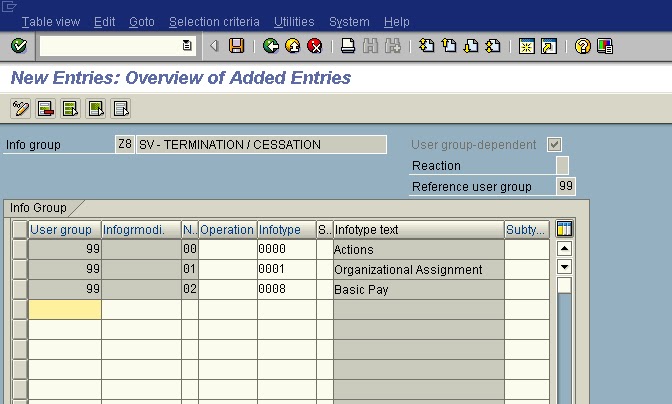
IMG -> PM -> PA -> Customizing Procedures -> Actions -> Define Infogroups -->Info group 
In this step we can assign of infotypes to Info group

Info group Name : Z1 **–HIRING –REGULAR


Click on New Entries .

 Info group Name : Z2 ** HIRING –CONTRACTOR

  Info group Name : Z8 ** TERMINATION          


Assign requied infotypes to all  infogroups .


2.Setup Personnel Actions

IMG -> PM -> PA -> Customizing Procedures -> Actions -> Setup Personnel Actions

è Personnel action types 


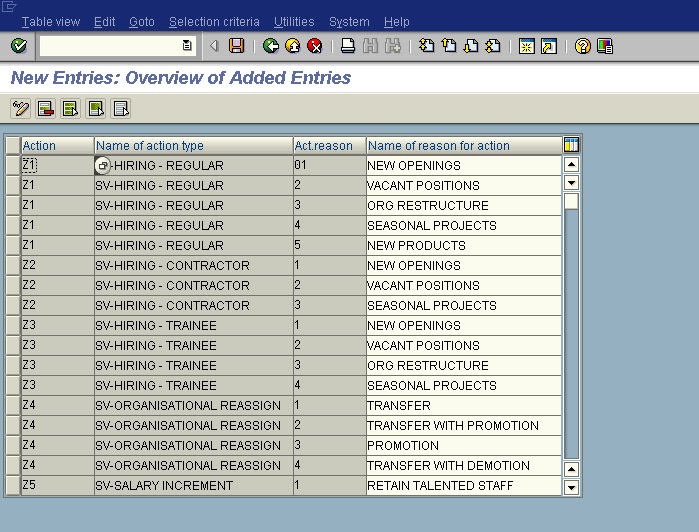
3.Create Reason For Personnel Action 

IMG -> PM -> PA -> Customizing Procedures -> Actions -> Create Reason For Personnel Action 

Create New Entries


4.Change Action Menu 

IMG -> PM -> PA -> Customizing Procedures -> Actions -> Change Action Menu 
àUser group dependency on Menus & infogroups

Note:
Infotype menu type must be “01 “, so change the text  and Ref group on the following screen 


à Action Menu